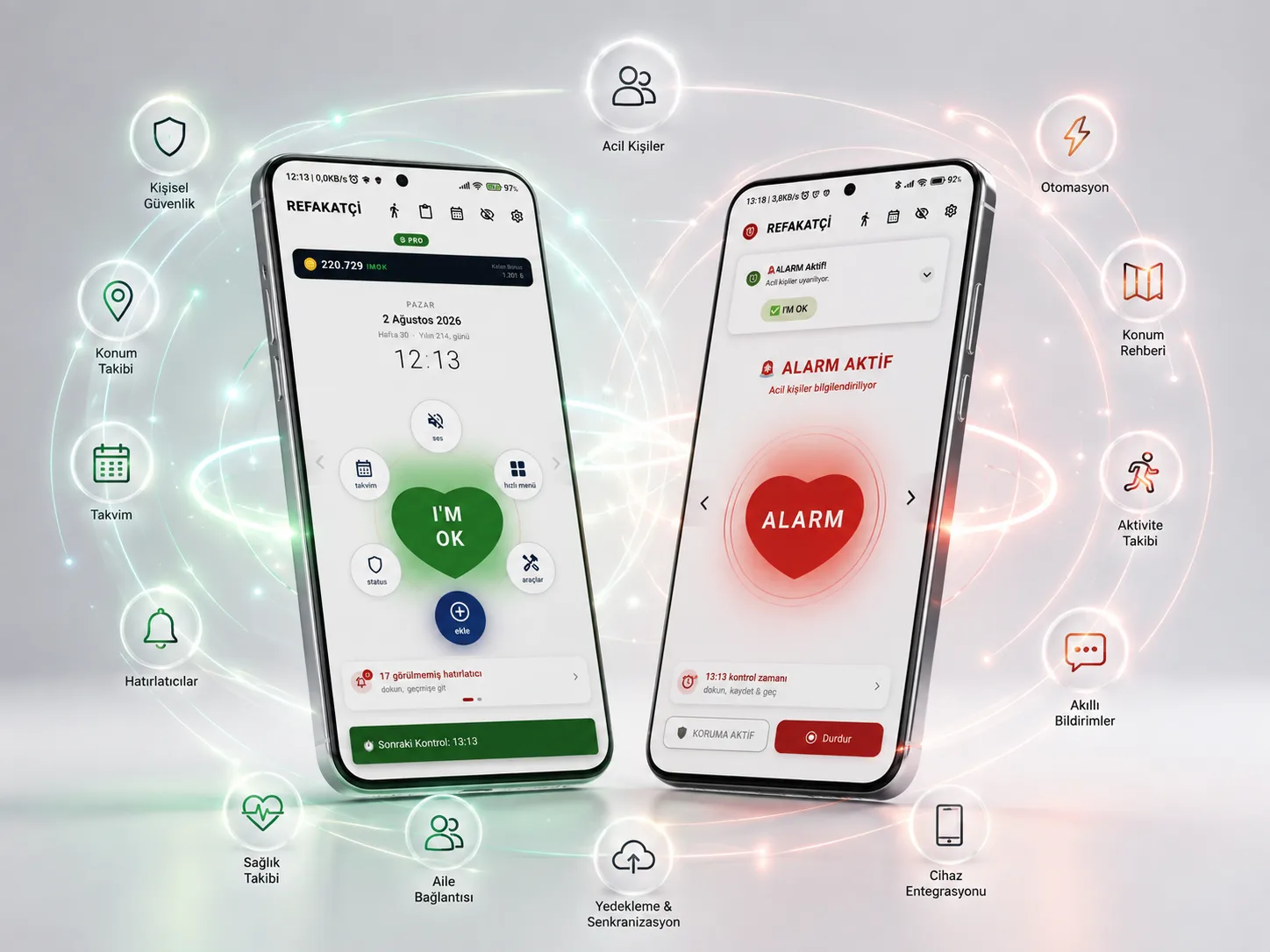
Companion Hub
Everything you need, on one screen, at a glance. Companion Hub is where Companion's heart beats. Check your status, ask for help, add reminders and reach every module from a single screen.
 iPhone version planned · Coming soon
Command Center — Everything on One Screen
Companion Hub is where Companion's heart beats. See your status, check in, ask for help and reach every module from a single screen. Say goodbye to complicated menus.
Center Heart — Read Your Status from Its Color
The heart's color tells you the system's status: Gray (inactive), Green (normal), Orange (waiting), Red (alarm). Understand where you stand at a glance.
One-Tap Check-in — In Seconds
When a Check-in Time notification arrives, tap the heart and your check-in is done. No menus, no switching screens. Done in seconds.
About the Module
Companion Hub is the main control screen and command center of the Companion app. You see your safety status at a glance on the Center Heart, check in, send a silent SOS and instantly reach other modules through the Orbital Menu. The Heart shows the system phase with its Gray, Green, Orange and Red colors. With the Quick Add Center you can create Reminders, Special Days, Location Reminders, Sticky Notes and To-do items with a single tap. Upcoming special days, notification summaries and recent activity keep you informed of everything. The IMOK Coin reward system rewards your check-in habit. Everything you need, on one screen, at a glance.
I can't see my safety status at a glance. Checking in takes too long. In an emergency I have to search for the help button. I wander between menus to add a reminder. I miss upcoming tasks.
Companion Hub offers status tracking, check-in and silent SOS through the Center Heart; gives access to every module through the Orbital Menu; and provides central control with Quick Add, the activity log and IMOK Coin.
Sorun
I Can't See My Safety Status at a Glance
It's hard to tell what stage the system is in.
When you open the app, you want to know your status right away. Is a Check-in Time waiting, in alarm, or is everything normal? The color-changing heart in Companion Hub shows all of this at a glance.
How It Works
How Does Companion Hub Work?
Reach the heart of Companion and manage everything from one screen, in three steps.
Yetenekler
What Companion Hub Can Do
Every capability is designed to solve a real need.
No opening the app, no navigating menus — just tap and carry on.
When a Check-in Time Arrived, You Checked In Within Seconds by Tapping the Heart
A Check-in Time notification arrived. The user opened the app and saw the green heart in Companion Hub. They tapped the heart, the check-in was completed and they earned IMOK Coin. The whole thing took 3 seconds.
Learn MoreAdd to your shopping list right away and get reminded later.
At the Store, You Created a New Reminder Without Leaving the Home Screen
While shopping, the user didn't want to forget to buy something. In Companion Hub they tapped Quick Add, chose Reminders, wrote the note and saved it — without ever leaving the home screen.
Learn MoreNobody noticed — and help came.
In an Emergency, You Sent a Silent SOS by Holding the Heart for 3 Seconds
The user was in a situation where they felt unsafe. They opened Companion Hub and held the heart for 3 seconds. A 3-2-1 countdown started, a silent SOS was sent and their location reached their loved ones. Nobody noticed they had asked for help.
Learn MoreAn orange heart said something was wrong.
When the Heart Changed Color, You Noticed the Alarm Status at a Glance
When the user opened Companion Hub, they saw the heart glowing orange and realized a Check-in Time was waiting. They checked in right away and the heart turned green again. If they hadn't noticed, it would have moved into the alarm phase.
Learn MoreLet no special day slip by.
You Saw an Upcoming Birthday on the Special Days Strip and Bought a Gift
When the user opened Companion Hub, they saw upcoming special days at the top and noticed that Mother's Day was 5 days away. They ordered a gift right away — no last-minute rush.
Learn MoreFeatures
Key features
Command Center — Everything on One Screen
Companion Hub is where Companion's heart beats. See your status, check in, ask for help and reach every module from a single screen. Say goodbye to complicated menus.
Center Heart — Read Your Status from Its Color
The heart's color tells you the system's status: Gray (inactive), Green (normal), Orange (waiting), Red (alarm). Understand where you stand at a glance.
One-Tap Check-in — In Seconds
When a Check-in Time notification arrives, tap the heart and your check-in is done. No menus, no switching screens. Done in seconds.
Silent SOS by Holding — 3 Seconds
In an emergency, press and hold the heart for 3 seconds. A countdown starts and a silent SOS is sent when it ends. Nobody notices, and help is on its way immediately.
Orbital Menu — Instant Access to Modules
Reach Calendar, Clipboard, Sound and Quick Add through the access points around the heart. Every module at your fingertips, all from one screen.
Quick Add Center — Create Without Leaving the Home Screen
Reminders, Special Days, Location Reminders, Sticky Notes and To-do items — create them with a single tap. Get things done without wandering around the app.
Activity Log and Summaries
Upcoming special days, unseen notifications and recent activity on one screen. See what's going on instantly, so nothing slips by.
IMOK Coin — Your Check-ins Are Rewarded
Earn IMOK Coin with every successful check-in. Your safety habits are rewarded and your motivation grows.
Screenshots
Take a Closer Look at Companion Hub
Who Is It For?
Who is Companion Hub for?
SSS
Frequently Asked Questions
- Companion Hub is the main control screen and command center of the Companion app. It's the central screen where you see your safety status, check in, send an SOS and reach the other modules.
- Gray: The system is inactive. Green: Everything is normal and active protection continues. Orange: A Check-in Time is waiting and a check-in is expected. Red: Alarm state — action is needed right away.
- A single tap on the Center Heart button in Companion Hub is all it takes. No need to navigate menus or switch screens inside the app. Your check-in is done within seconds.
- When you press and hold the heart button for 3 seconds, a 3-2-1 countdown starts. When it ends, a silent SOS is sent, and your location and status are passed on to the emergency contacts you've chosen.
- They're the access points around the Center Heart. They give one-tap access to features such as Calendar, Smart Clipboard, Voice Commands and Quick Add.
- You can create Reminders, Special Days, Location Reminders, Sticky Notes and To-do items without leaving the home screen.
- You earn IMOK Coin with every successful check-in. By checking in regularly, you can build up coins and benefit from loyalty programs and special perks.
Get started
Companion is now on Google Play!
Start free and move to Pro when you need it.
You can download our Android app from Google Play; an iPhone version is planned.