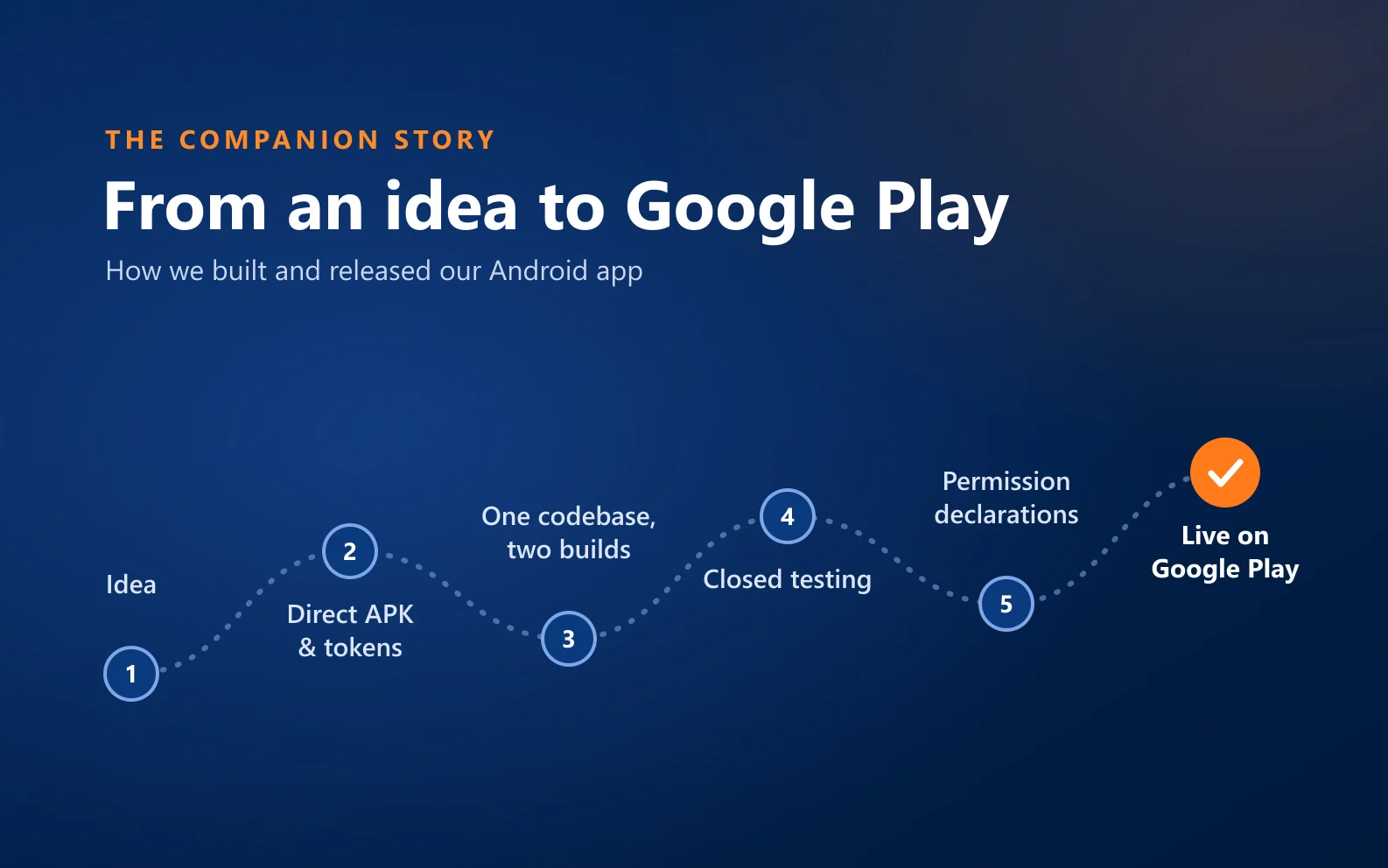
Companion is on Google Play today. The road there was not straight; this article covers what we did and why, where we got it wrong and what we learned. We hope it is useful for anyone preparing an Android app for release.
First, from our own website
The first versions of Companion were not on Google Play. They were distributed as an installation file (APK) downloaded from our own website. Pro features were unlocked with a purchased token code, and sales were handled largely by hand, over messaging.
That order was deliberate. We did not want to put the app on a store before real people had used it. Direct distribution let us ship versions quickly and act on feedback straight away; we built our own update system during this period too. The cost was clear: users had to allow "installing from unknown sources", which is a real hurdle, especially for older users.
One codebase, two builds
On Google Play, digital content can only be sold through Google Play's own billing. Token sales could not exist in the Play build. Instead of maintaining two projects, we decided to produce two builds from one codebase.
Which build is produced is decided at compile time. The important detail: in the Play build the token code is not "hidden", it is not in the compiled app at all. You don't go into a policy review with "it's probably switched off"; the code is either there or it isn't. The same way, we kept the rewards system, whose fit with Play's rules needs a separate review, switched off in the Play build for now.
Today the two channels sit side by side: Google Play is the main channel, direct installation is a secondary option. The two builds are not identical; the payment method and some features differ.
Developer account: personal instead of organisation
Google Play has two kinds of developer accounts. Organisation accounts are exempt from the closed-testing requirement for new accounts, so that was our first choice. Our application for the international business registration that organisation accounts require (D-U-N-S) came back negative, because our business is not listed in the registry that check relies on.
Rather than force that route, we continued with a personal developer account. It comes with the closed-testing requirement, but it was a path we could start the same day and whose length we knew. Looking back, it was the right call: it turned an open-ended wait into a job with a timeline.
Closed testing: 12 people, 14 days
For new personal accounts, Google requires at least 12 testers to keep the app installed for 14 days without a break before it can go public. Adding an email to a list is not enough; each person has to accept the invitation and install the app from Google Play with their own Google account. If the number drops below 12, the count starts over.
Our first closed-testing submission was rejected. The reason was not a bug but a declaration: we had put the app in the wrong category in the health question. Companion is not a medical app; we corrected the declaration to match what the app actually does, and the submission was approved within a day.
Some of what testers reported during the closed test went straight into the app. Once the 14 days were complete, we applied for production access.
The real work: permissions and declarations
Releasing on Google Play is not uploading a file and waiting. Companion is a safety app; by its nature it uses sensitive permissions, and each one is reviewed separately.
- Background location. Location reminders need to check your location while the app is closed. Google asks for a clear in-app disclosure screen, a separate declaration and a video showing where the permission is actually used. So we rewrote our disclosure: it says "in the background" and "while the app is closed" plainly, and it says that every other feature keeps working if the user declines.
- Foreground service and full-screen alerts. The permissions that let alarms and the "Are you OK?" screen open even on a locked phone were justified too.
- Narrowing the permission list. Every permission means a justification and a review. Where a narrower path existed, we took it, and we removed permissions the app did not need.
- The Data safety form. We filled it in by going through the code, not by guessing: what is collected, where it goes and why. Sending a notification to the people you chose in an emergency is declared as "data sharing". A form that does not match real behaviour would have been the most expensive mistake to be caught on later.
Then there is wording. In the store listing and in the app, we were careful not to promise medical or emergency intervention. Instead of "detects falls and calls for help", we say what it does: it notifies the people you have chosen.
The last weeks: polishing for our audience
Many people who use Companion are older users or their relatives. When we increased the phone's text size, some screens fell apart; for us, large text was not an edge case but the default scenario. In the final weeks before release we reworked screens for large text and different screen sizes, added app-icon shortcuts for frequent actions and gave reminders a snooze button.
We tried these builds in internal testing first, then submitted 1.19.13, our first production version, to Google Play. We opened the release gradually, and the app became publicly available on Google Play on 13 October 2026.
What we learned
- Declarations take more effort than code. Technical readiness is not the finish line; permissions, data and health answers have to match the app's real behaviour exactly.
- Version numbers are permanent. Every version code uploaded to Google Play can never be reused. Plan the numbering of your direct and store builds from the start.
- Running two distribution channels from one codebase works, but the split must live in one place. Conditions scattered across the code will eventually miss something.
- The audience shapes technical decisions. Large text, read-aloud and a calm home screen were not "nice to have"; they were usability itself.
- Changing the road can be faster than waiting on an uncertain one.
What's next
We keep updating the Google Play version. An iPhone version is planned; we are not giving a date yet. To see the app itself: Companion is now on Google Play.
None of the decisions here are specific to Companion. If you are preparing your own mobile app for release, our mobile app development page explains how we work.

 HaberFeatured
 Blog
Blog